Acrylic Procreate Brushes Painting Kit: A Digital Artist’s Guide to Realistic Results
Transform Your iPad into a Realistic Acrylic Art Studio
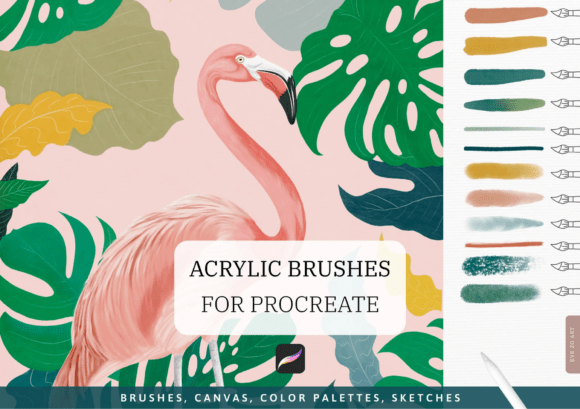
If you're an artist looking to bring the depth and texture of traditional acrylic painting into the digital world, the Acrylic Procreate Brushes Painting Kit offers a powerful solution. Designed for Procreate 5 and newer versions, this kit includes 12 high-quality brushes, a pre-textured canvas, color palettes, and more—all aimed at replicating the tactile feel of real acrylics on your iPad.
Whether you're a beginner exploring digital painting or a seasoned illustrator aiming for more authentic textures, this kit promises a streamlined way to create rich, layered artwork. But like any creative tool, its effectiveness depends heavily on how you use it—and what you expect from it.
Common Missteps and How to Avoid Them
Many users jump into digital painting with high hopes, only to find their results falling short. These issues often stem not from the tools themselves, but from misunderstandings about how to apply them effectively. Here are some common pitfalls and how to sidestep them.
1. Assuming “Realistic” Means “Automatic”
One of the most frequent misconceptions is that realistic brushes will automatically produce professional results. While the Professional Realistic Acrylic Procreate Brushes do an excellent job mimicking the texture and behavior of real acrylics, they still require skill and technique to use effectively.
Better Approach: Take time to study how each brush responds to pressure, layering, and blending. Practice building up paint in stages, just as you would with physical acrylics. This builds familiarity and control.
2. Overlooking Canvas Quality and Setup
The included Magic Canvas is a valuable asset, but many users neglect to consider the importance of canvas resolution and texture when starting a new piece. Choosing the wrong canvas size or ignoring texture settings can diminish the realism the brushes are designed to create.
Better Approach: Use the included 6364×4500 px or 4243×3000 px canvases for high-quality output. Make sure to understand how texture interacts with brush opacity and blending modes to enhance realism.
3. Not Leveraging the Full Kit
The kit includes more than just brushes—there are color palettes, ready-to-use sketches, and a detailed guide. Many users import only the brushes and miss out on tools that can significantly speed up workflow and improve consistency.
- Use the 7 curated color palettes to maintain a cohesive color scheme.
- Import the 10 transparent PNG sketches for quick composition ideas or practice.
- Refer to the PDF guide for installation tips and brush usage suggestions.
4. Skipping the Learning Curve
Some artists expect immediate mastery after installing the brushes. The truth is, even the most realistic digital tools require time to learn. Trying to rush the process can lead to frustration and subpar results.
Better Approach: Dedicate time to practice with each brush type. Try replicating simple still-life studies or texture swatches to understand how each one behaves. Watch tutorials or follow along with digital acrylic painting guides to build your technique.
Choosing the Right Tools and Settings
Before diving into a project, take a moment to evaluate your setup. Here’s what to check before using the Acrylic Procreate Brushes Painting Kit:
- Procreate Version: Ensure you're using Procreate 5 or newer for full compatibility.
- iPad Compatibility: Confirm your iPad supports the brushset and canvas resolutions included.
- Brush Testing: Load each brush and test on a sample canvas to understand texture, opacity, and blend behavior.
- Color Management: Experiment with the included palettes before creating your own to maintain a painterly feel.
Realistic Results Start with Realistic Expectations
One of the most important aspects of using the Acrylic Procreate Brushes Painting Kit is understanding its role in your creative process. These brushes are tools, not shortcuts. They help you simulate the look and feel of acrylic paint, but your technique and artistic decisions determine the final outcome.
For example, if you're painting a textured landscape, using only one brush type can make your work appear flat and repetitive. Instead, layer different brushes—like a dry brush for texture, a soft wash for background, and impasto for highlights—to build depth and dimension.
Installation and Setup Tips
While the kit offers an instant download, installation can be confusing for first-time users. Here’s how to get everything up and running smoothly:
- Download the ZIP file and extract its contents.
- Open Procreate and import each .brushset file via the Brush Library.
- Import the Magic Canvas file to start with a realistic surface.
- Load color palettes by importing the .swatches files into the Color panel.
If you encounter issues, check the included PDF guide for troubleshooting tips. Also, make sure your iPad has enough storage space to handle large canvas files, especially the 6364×4500 px option.
Who Should Use This Kit?
The Acrylic Procreate Brushes Painting Kit is ideal for a wide range of creators:
- Artists transitioning from traditional to digital mediums.
- Illustrators looking for realistic textures without scanning physical paintings.
- Designers wanting to add organic brushwork to digital projects.
- Educators teaching digital painting techniques to students.
- Content creators producing tutorials or digital art for social media.
Whether you're creating fine art, concept sketches, or commercial illustrations, this kit can help elevate your work—provided you approach it with intention and practice.
Final Thoughts: Getting the Most from Your Digital Acrylic Experience
Realistic digital painting isn’t about finding the perfect brush—it’s about understanding how to use your tools effectively. The Acrylic Procreate Brushes Painting Kit offers a fantastic foundation, but it’s your skills, patience, and creativity that will bring your work to life.
Before purchasing or using any digital brush pack, always consider your current skill level, project goals, and technical setup. Don’t be swayed by flashy promises—look for tools that offer flexibility, quality, and support. And most importantly, give yourself permission to experiment, make mistakes, and grow as an artist.