Doodlefill Procreate Pattern Brushes: Create Bold, Seamless Designs in Seconds
If you're a digital artist, designer, or creator working in Procreate, you know how time-consuming it can be to manually fill large areas with intricate patterns. Enter Doodlefill Procreate Pattern Brushes – Volume 01 — a set of 10 hand-drawn seamless pattern brushes designed to streamline your workflow and elevate your artwork. Whether you're creating coloring book pages, mandalas, or digital prints, these brushes offer a fast, efficient way to achieve clean, professional results.
What Are Doodlefill Procreate Pattern Brushes?
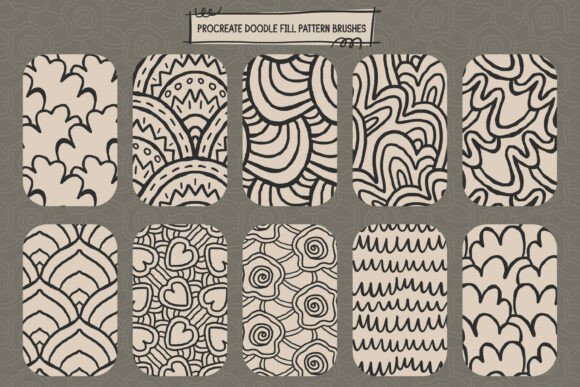
The Doodlefill Procreate Pattern Brushes are a curated collection of digital brushes specifically made for the Procreate app. Each brush contains a unique, hand-drawn pattern that seamlessly repeats across any surface, making it easy to fill large areas without visible seams or repetition issues. These brushes are ideal for artists who want to maintain a cohesive visual style while saving time on detailed pattern work.
Key Features of the Doodlefill Brush Set
- 10 unique seamless pattern brushes — each with its own distinct design and character
- High-resolution, repeat-ready patterns — perfect for print and digital use
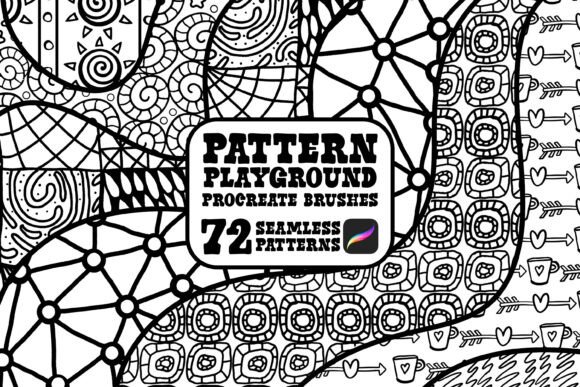
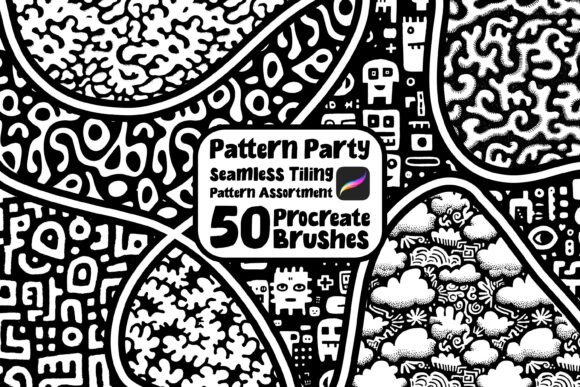
- Clean black and white line art — no grey tones or shading for crisp, professional output
- Designed for fast fills — ideal for coloring pages, backgrounds, and texture overlays
Why Use Seamless Pattern Brushes in Procreate?
Seamless patterns are essential for a variety of design projects, especially when creating artwork that needs to repeat without visible breaks. Traditional methods of pattern creation often involve tedious manual adjustments and tiling tests. With Doodlefill brushes, you eliminate that hassle. Just brush over the area you want to fill, and the pattern automatically repeats with perfect alignment.
This is especially useful for:
- Coloring book illustrations
- Mandala and geometric art
- Surface pattern design for fabric or wallpaper
- Backgrounds for digital papers and graphic elements
Real-World Applications of Doodlefill Brushes
Let’s look at a few practical scenarios where Doodlefill Procreate Pattern Brushes can make a real difference:
- Coloring Book Creation: Quickly fill intricate outlines with playful, hand-drawn textures that make each page engaging and unique.
- Mandala Design: Use bold patterns to add depth and visual interest to symmetrical illustrations.
- Print-on-Demand Products: Create eye-catching designs for t-shirts, mugs, and notebooks with seamless, high-contrast linework that prints clearly.
- Digital Paper Packs: Generate patterned backgrounds for planners, journals, or graphic design projects in seconds.
Who Can Benefit from This Brush Set?
Whether you're a hobbyist, a professional illustrator, or an entrepreneur creating content for print-on-demand platforms, Doodlefill brushes can enhance your creative process. Here’s a breakdown of who might find them most useful:
- Beginner artists: Simplify complex pattern fills without needing advanced design skills.
- Illustrators: Add texture and depth to your work quickly and consistently.
- POD creators: Generate print-ready designs faster, especially for platforms like Amazon KDP or Etsy.
- Surface pattern designers: Experiment with seamless repeats for fabric, wallpaper, and more.
What’s Included in Volume 01?
The first volume of Doodlefill Procreate Pattern Brushes includes:
- 10 ready-to-use Procreate brushes
- High-resolution brush textures optimized for clarity
- Preview images showing how each brush looks in action
All brushes are designed with clean, high-contrast black linework, ensuring they remain sharp and professional, whether viewed digitally or printed physically.
How to Use Doodlefill Brushes in Your Workflow
Using these brushes is straightforward. After importing them into Procreate, simply select the brush and start painting over the area you want to fill. The pattern will automatically repeat across the canvas. You can adjust the brush size and opacity to suit your design needs. Because each pattern is seamless, you won’t need to worry about aligning tiles or editing for continuity.
Tip: For best results, use Doodlefill brushes on separate layers. This allows you to easily modify or remove patterns without affecting the rest of your artwork.
Design Considerations and Limitations
While Doodlefill brushes are incredibly useful, there are a few things to keep in mind:
- Compatibility: These brushes are designed for use in the Procreate app only.
- Black and white only: If you're looking for shaded or colored patterns, you'll need to add those manually.
- Pattern variety: Volume 01 offers 10 different designs — enough for many projects, but you may want to expand your collection over time.
Final Thoughts: Is Doodlefill Right for You?
If you frequently work with patterns, especially in black and white, Doodlefill Procreate Pattern Brushes – Volume 01 is a valuable addition to your toolkit. It helps you save time, maintain design consistency, and focus more on the creative aspects of your work rather than the technical details of pattern creation.
Whether you're designing for personal projects, commercial use, or print-on-demand platforms, these brushes offer a practical, efficient way to enhance your digital illustrations. And with clean, high-contrast linework and seamless tiling, you can be confident your designs will look polished and professional every time.