Grunge Texture Brushes for Creative Digital Art
Adding depth and character to digital artwork can transform a clean, flat design into something with soul and history. The 12 Grunge Texture Brushes D1 offer a straightforward and effective way to introduce organic, weathered textures into your projects. Whether you're designing a poster, enhancing a photo, or creating a mixed-media collage, these brushes bring a tactile, real-world feel to digital work.
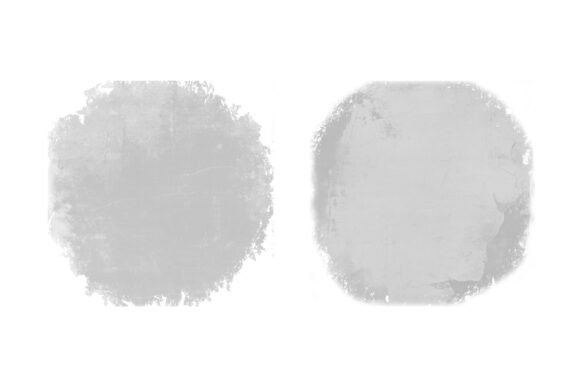
Each brush in this set is crafted to mimic the look of natural wear and tear—think cracked surfaces, ink splatters, paper tears, and faded edges. They're especially useful for designers, illustrators, and hobbyists who want to add a vintage or edgy aesthetic without spending hours creating textures manually. With just a few clicks, you can instantly give your work a layered, lived-in appearance.
What You Get with 12 Grunge Texture Brushes D1
The package includes a single zip file containing 12 Photoshop-compatible brushes in ABR format (020226-1). These brushes are ready to install and use right out of the box, making them accessible even for beginners. Each one has a unique texture pattern, allowing for varied applications and combinations. You can layer them, adjust opacity, or blend with other elements to suit your specific design needs.
Because they’re designed for Adobe Photoshop, they integrate smoothly into a familiar creative workflow. This makes them a versatile tool not only for graphic designers but also for photographers, digital illustrators, and social media content creators who use Photoshop regularly.
Why These Brushes Matter for Your Design Projects
In today’s visual world, standing out often means going beyond polished, pristine designs. The 12 Grunge Texture Brushes D1 help you break away from overly smooth digital looks by adding a sense of history and realism. Whether you're creating a rustic logo, distressed typography, or a vintage-style flyer, these brushes can be the finishing touch that makes your design feel more authentic and expressive.
They’re especially valuable when working on:
- Vintage posters that need a worn, retro look
- Branding materials for small businesses aiming for a handcrafted or indie vibe
- Photographic overlays that add depth and mood to portraits or landscapes
- Lettering and calligraphy that benefits from textured strokes
- Digital scrapbooking and mixed-media art projects
Real-World Uses for Grunge Texture Brushes
Let’s look at a few practical scenarios where these brushes can make a difference:
- A blogger designing social media graphics can use a subtle grunge brush to give a background a more organic feel, helping text and images stand out while maintaining a cohesive aesthetic.
- An entrepreneur launching a new product might use one of the textured brushes to create a vintage-style label or packaging mockup that feels handcrafted and authentic.
- A student working on a digital art assignment can layer multiple brushes to simulate the look of mixed media without needing physical supplies.
- A freelance designer building a portfolio of diverse styles can incorporate these brushes to show a range of techniques, including distressed and urban looks.
Getting Started with Grunge Textures
If you're new to using texture brushes, don’t worry—these are beginner-friendly and intuitive. Start by selecting a brush and applying it on a separate layer so you can adjust its impact without altering your original artwork. Experiment with blending modes like Multiply, Overlay, or Soft Light to see how different effects interact with your design.
Also, remember that less is often more. A single well-placed texture can have more impact than several layered on top of each other. Use these brushes to enhance your work, not overwhelm it.
Things to Consider Before Using These Brushes
Before diving in, here are a few tips to help you get the most from the 12 Grunge Texture Brushes D1:
- Compatibility: Make sure you're using a version of Photoshop that supports ABR brush files. Most modern versions do, but it’s good to double-check if you're using an older version.
- Resolution: For best results, use these brushes at high resolution to maintain clarity and detail, especially if you're preparing work for print.
- Layer management: Always apply textures on their own layers so you can fine-tune opacity, blending modes, and masks without affecting your main artwork.
- Customization: Don’t be afraid to tweak brush settings like size, spacing, and scattering to suit your specific project.
- Licensing: If you plan to use these brushes in commercial work, verify whether any usage restrictions apply. Most digital brushes are safe for personal and commercial use, but it's always wise to confirm.
Final Thoughts on Adding Texture to Your Work
Textures breathe life into digital art, and the 12 Grunge Texture Brushes D1 offer a simple, powerful way to introduce that tactile quality into your designs. Whether you're a seasoned professional or just starting out, these brushes can help you achieve more expressive, visually rich results. By understanding how and when to use them, you open up new creative possibilities and enhance your digital toolkit.
With a little experimentation, you’ll find these brushes can become a go-to resource for adding depth, mood, and authenticity to your work—no matter your style or skill level.