Procreate Coloring Book Pattern Brushes: Creative Tools for Print and Digital Art Projects
What Are Procreate Coloring Book Pattern Brushes?
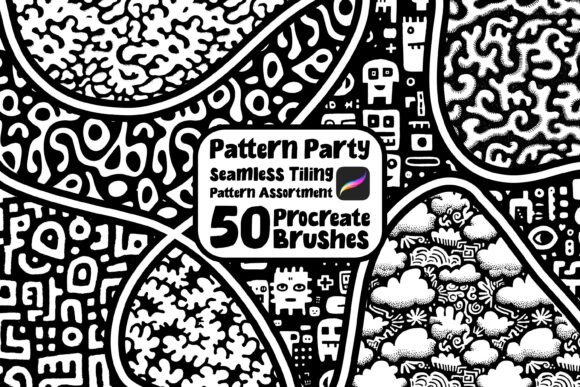
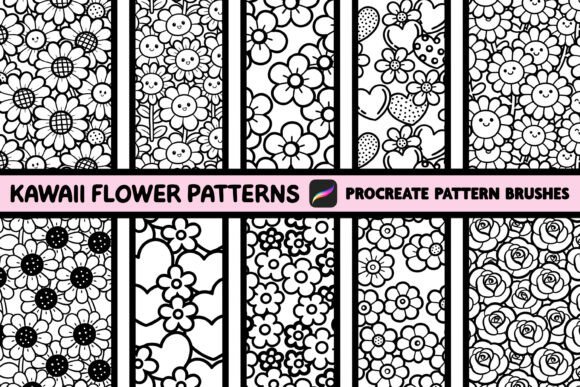
Procreate Coloring Book Pattern Brushes is a set of ten seamless tiling brushes designed specifically for the Procreate app. These brushes feature kawaii-style patterns that evoke the charm of classic coloring book illustrations. They’re ideal for artists, designers, and self-publishers looking to create engaging printable coloring pages or enhance their KDP (Kindle Direct Publishing) coloring book projects.
Each brush in the set was created with the help of AI, ensuring a unique blend of digital efficiency and artistic appeal. While they work beautifully as standalone patterns, they’re also perfect for filling sections in zentangle-style artwork, offering flexibility across different creative applications.
Who Can Benefit from These Pattern Brushes?
These brushes cater to a wide range of creators, especially those focused on printables, digital art, and book publishing. Here’s how different users might apply them in real-world situations:
- Indie Authors and Self-Publishers: If you're creating coloring books for Amazon KDP, these brushes help you design intricate backgrounds or themed pages quickly. For example, a nature-themed coloring book could benefit from floral patterns that tile seamlessly across pages without visible repetition.
- Printable Designers: Whether you're selling digital downloads on Etsy or your own website, these brushes can speed up the creation of themed printables—like birthday cards, planners, or wall art—with a whimsical, coloring-book aesthetic.
- Artists and Illustrators: Zentangle enthusiasts and mandala designers can use these brushes to fill complex shapes with repeating motifs, adding depth and visual interest without having to draw each element manually.
- Teachers and Homeschoolers: Educators creating custom activity sheets can use these patterns to design engaging, printable coloring pages that keep students entertained while reinforcing themes like nature, holidays, or mindfulness.
Real-World Applications for Creative Projects
Let’s explore a few practical scenarios where these brushes can make a real difference:
1. Coloring Book Creation for KDP
If you're designing a coloring book for Amazon KDP, consistency and variety are key. With these brushes, you can easily generate a range of themed backgrounds—like floral borders, polka dot fills, or cute animal motifs—that maintain visual cohesion across your book. You can also use them to frame line art illustrations, giving your pages a polished, professional look without spending hours drawing patterns by hand.
2. Custom Printables for Etsy Shops
For Etsy sellers, time is money. These brushes let you quickly generate printable designs that customers love—think birthday invitations with patterned backgrounds, themed planners with decorative borders, or seasonal greeting cards with a playful, coloring-book style. The seamless tiling ensures your designs look clean and professional, even when printed at larger sizes.
3. Mindfulness and Meditation Art
Many adults use coloring as a form of stress relief and mindfulness. These brushes are perfect for creating relaxing, repetitive patterns that encourage focus and creativity. Whether you're designing pages for a meditation coloring journal or crafting your own personal art therapy practice, the kawaii aesthetic adds a cheerful, calming energy to the process.
Things to Consider Before Using These Brushes
While these brushes offer a lot of creative freedom, there are a few important considerations before diving in:
- Procreate Proficiency: These brushes are best suited for users who already have a basic understanding of the Procreate app. If you're new to digital art, you may want to spend some time learning brush settings and layer management before incorporating these tools into your workflow.
- Brush Installation: Installing custom brushes in Procreate requires a few steps, including downloading the brush files and importing them into the app. Make sure you follow the instructions carefully to avoid issues.
- Pattern Scaling: Because these brushes are designed to tile seamlessly, it's important to test how they look at different zoom levels and brush sizes. Some patterns may appear stretched or distorted if not adjusted properly.
- Design Intent: These brushes lean toward a kawaii, whimsical style. If you're aiming for a more realistic or minimalist look, they may not be the best fit for your project.
Strengths and Limitations of the Brush Set
Like any creative tool, Procreate Coloring Book Pattern Brushes have their strengths and limitations. Understanding both can help you make the most of them.
Key Strengths
- Time-Saving: These brushes eliminate the need to manually draw repetitive patterns, allowing you to focus on the overall composition of your artwork.
- Versatile Use: Whether you're creating standalone backgrounds or filling intricate shapes in zentangle art, these brushes adapt well to different styles and purposes.
- Print-Ready Quality: Designed with seamless tiling in mind, these brushes ensure your patterns look clean and professional when printed at any size.
- AI-Assisted Design: The use of AI in pattern creation adds a modern touch while maintaining the charm of traditional coloring book aesthetics.
Potential Limitations
- Learning Curve: Users unfamiliar with Procreate or digital brushes may need time to adjust to the interface and brush behavior.
- Style Specificity: The kawaii theme may not align with every artistic vision, especially those leaning toward realism or abstract minimalism.
- Customization Limits: While the brushes are optimized for tiling, modifying them to suit specific design needs (like changing colors or adjusting spacing) may require advanced brush editing skills.
Getting the Most Out of Your Pattern Brushes
To maximize the value of Procreate Coloring Book Pattern Brushes, consider the following tips:
- Experiment with Layer Blending: Try using the brushes on separate layers with different blend modes (like Multiply or Overlay) to create depth and texture in your designs.
- Combine with Other Brushes: Mix these pattern brushes with Procreate’s default brushes or other custom sets to build more complex, layered illustrations.
- Create Reusable Swatches: Once you find a pattern combination you love, save it as a swatch or reusable brush preset for future projects.
- Use in Animation: If you're exploring animation in Procreate, these brushes can be used to create consistent backgrounds across multiple frames, adding visual continuity to your work.
Remember, the best way to learn is by doing. Don’t be afraid to play around with brush sizes, opacity settings, and layer effects to see how each pattern behaves in different contexts. Over time, you’ll develop a sense of which brushes work best for your specific projects and artistic style.