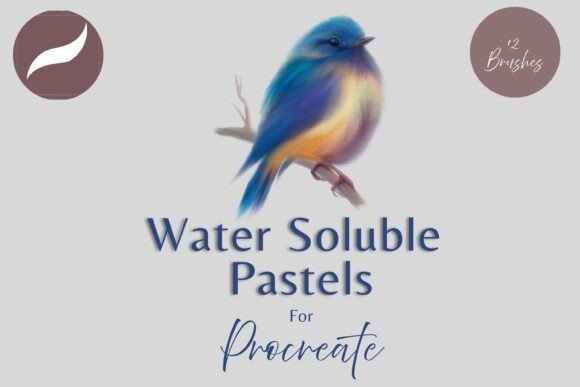
Water Soluble Pastels Procreate Brushes for Digital Artists
For digital artists who want to bring the soft, expressive quality of traditional pastels into their iPad illustrations, the Water Soluble Pastels Procreate Brushes pack offers a versatile and intuitive solution. These 12 custom brushes are designed specifically for the Procreate app, blending texture, watercolor-like diffusion, and pressure sensitivity to mimic the look and feel of real pastel media. Whether you're a professional illustrator, educator, or creative hobbyist, this brush set enhances your digital workflow with painterly depth and expressive control.
Key Features of Water Soluble Pastels Procreate Brushes
The Water Soluble Pastels Procreate Brushes stand out for their textured strokes, fluid blending, and dynamic responsiveness. Each brush reacts to pressure input from the Apple Pencil, allowing for subtle gradations and bold marks alike. This level of control makes them ideal for both detailed illustrations and loose, atmospheric sketches.
- Pressure-sensitive behavior: Adjust stroke intensity based on how hard you press the Apple Pencil
- Blend and paint modes: Use brushes for direct color application or soft blending, depending on your needs
- Adjustable opacity and size: Easily tweak brush strength with the opacity slider or resize using Procreate's built-in tools
- Customizable blend ink charge: Modify blending intensity by adjusting blend modes and opacity settings
- Textured and watery effects: Mimic the grain and diffusion of real pastels and watercolor washes
How to Install and Use the Brushes
Using the Water Soluble Pastels Procreate Brushes requires a few straightforward steps. Since these brushes are digital files, you'll need a cloud storage service like iCloud to download them and a file-unzipping app like iZip to extract the contents. Once extracted, you can import the brushes directly into Procreate, where they'll appear in a dedicated folder for easy access.
- Download the brush files to your iPad using iCloud or a similar service
- Open the downloaded ZIP file using iZip or another unarchiving app
- Tap the .brush files to import them into Procreate
- Find the brushes in the “Water Soluble Pastels” folder under the Procreate brush library
Once installed, you can start experimenting with different brushes to see which ones suit your style best. From dry, chalky strokes to wet, blended washes, each brush offers a unique effect that can be further customized through Procreate’s interface.
Practical Applications Across Creative Fields
The Water Soluble Pastels Procreate Brushes are not limited to fine artists—they’re also valuable tools for professionals in design, education, marketing, and content creation. Here are a few ways different users can benefit from this brush set:
- Illustrators: Create soft, layered portraits or nature scenes with rich textures and smooth transitions
- Graphic designers: Add hand-drawn elements to digital layouts for a more organic aesthetic
- Educators: Demonstrate painting techniques or create visual aids with a tactile, expressive quality
- Bloggers and content creators: Design engaging thumbnails or infographics with a painterly touch
- Entrepreneurs: Craft custom branding materials, social media visuals, or product mockups with a unique artistic flair
Real-World Examples and Use Cases
Consider a freelance artist working on a children’s book illustration. With the Water Soluble Pastels Procreate Brushes, they can layer soft pastel hues for a dreamy background and then switch to a sharper, drier brush for character outlines. The blend brushes allow for seamless transitions between colors, reducing the need for complex layering or manual blending.
In another scenario, a small business owner might use these brushes to design a custom logo that incorporates a hand-painted look. The textured strokes add authenticity and warmth, helping the brand stand out in a digital-heavy marketplace. Similarly, a teacher creating digital art lessons can use these brushes to demonstrate how traditional pastel techniques translate to a digital canvas.
Why These Brushes Enhance Your Digital Workflow
One of the biggest advantages of the Water Soluble Pastels Procreate Brushes is how they streamline the creative process. Because each brush is pre-configured with pressure sensitivity and blending capabilities, artists spend less time adjusting settings and more time creating. This efficiency is especially valuable for professionals working under tight deadlines or content creators producing regular visual material.
The ability to resize brushes on the fly using Procreate’s move and resize tool adds another layer of convenience. Whether you're working on a small-scale sketch or a large digital painting, you can scale your tools without losing quality or control. Additionally, the opacity and blend mode adjustments allow for fine-tuned blending, giving your work a more polished, professional finish.
Considerations When Using These Brushes
While the Water Soluble Pastels Procreate Brushes offer a lot of creative potential, there are a few things to keep in mind when using them effectively:
- Device compatibility: You’ll need an iPad Pro and Apple Pencil to take full advantage of pressure sensitivity and blending features
- Storage space: Make sure your iPad has enough storage to accommodate the brush files and any large Procreate canvases you create
- Learning curve: If you're new to Procreate or digital painting, take time to experiment with different brushes and settings to find what works best for your style
- Layer management: While these brushes are powerful, they can add texture and depth that may require additional layers for optimal control and editing
By understanding these practical considerations, you can maximize the value of the Water Soluble Pastels Procreate Brushes and avoid common frustrations that come with learning new digital tools.
Final Thoughts
The Water Soluble Pastels Procreate Brushes provide a compelling blend of realism, flexibility, and ease of use for digital artists at any skill level. Whether you're aiming to replicate the softness of traditional pastels or enhance your digital illustrations with painterly effects, this brush set delivers both quality and versatility. With thoughtful integration into your workflow, these brushes can elevate your creative output, improve your efficiency, and help you produce more engaging, expressive artwork.