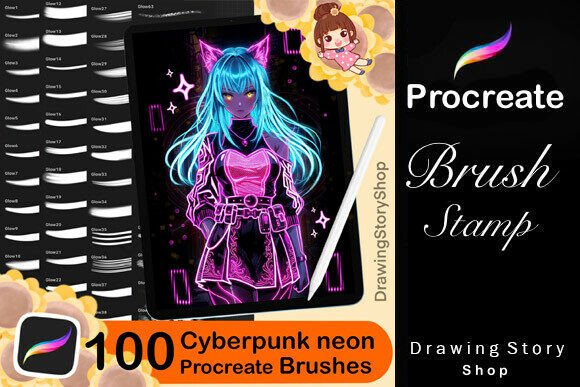
100 Procreate Cyberpunk Glow Brushes – Digital Art Made Electric
Whether you're a digital illustrator, social media content creator, or just someone who loves experimenting with visual design, the 100 Procreate Cyberpunk Glow Brushes pack offers a powerful way to add futuristic, neon-infused effects to your artwork. Designed specifically for use with the Procreate app on iPad, these brushes bring a vibrant, glowing aesthetic that mimics the look and feel of cyberpunk lighting, neon signs, and electric atmospheres.
What You Get and How It Works
This brush set includes exactly what the name promises—100 uniquely crafted Cyberpunk Glow Brushes, each tailored to help you achieve different lighting effects, from soft glows to sharp neon flares. Once purchased, you'll get immediate access to download the brushes along with a helpful PDF guide that walks you through the process of importing them into your Procreate app. No complicated setup, no technical headaches—just a straightforward way to expand your creative toolkit.
Who Can Benefit From These Brushes?
The beauty of this brush pack lies in its versatility. Whether you're an illustrator, a graphic designer, or a content creator, these brushes can enhance your digital workflow in meaningful ways. Here's a look at how various types of users can put them to work:
Illustrators and Digital Artists
If you create digital illustrations, especially in sci-fi, fantasy, or futuristic genres, these brushes can dramatically elevate your work. You can use the neon glow effects to highlight energy sources, simulate glowing tech, or create ambient lighting in your scenes. For example, imagine drawing a cityscape at night—these brushes can help you easily simulate neon signs, glowing windows, and street lights without having to manually blend or paint each light source.
Social Media Creators and Marketers
Visual content is king on platforms like Instagram, TikTok, and Pinterest. The 100 Procreate Cyberpunk Glow Brushes allow creators to design eye-catching thumbnails, story graphics, and promotional images with a modern, energetic edge. A digital artist promoting their work can use these brushes to create glowing text headers, animated-style thumbnails, or background effects that make their posts stand out in a crowded feed.
Print-on-Demand Entrepreneurs
If you're selling digital art prints, stickers, or apparel through platforms like Etsy or Redbubble, these brushes can help you create unique, high-impact designs. Neon glow effects are especially popular in modern art and apparel trends. You can use these brushes to add glowing elements to t-shirt graphics, poster designs, or phone cases, giving your products a distinctive look that appeals to younger, trend-conscious audiences.
Educators and Digital Presenters
Even educators and trainers who create digital content can benefit from this brush set. If you're designing slides, infographics, or educational illustrations, a touch of neon glow can help emphasize key points or make diagrams more visually engaging. For example, a teacher creating a science diagram could use a glowing brush to highlight a light source or energy flow, making the concept more intuitive for students.
Real-World Use Cases and Creative Possibilities
Let’s take a look at a few practical scenarios where the Cyberpunk Glow Brushes can make a real difference:
- Comic and Manga Artists: Add glowing energy blasts, magical auras, or futuristic tech effects to your panels without spending hours on blending modes.
- Logo and Brand Designers: Create glowing versions of logos or brand elements for clients in tech, music, or entertainment industries.
- UI/UX Designers: Use the brushes to mock up glowing buttons or interface elements for app or website concepts.
- Game Concept Artists: Quickly add neon lighting to character designs, environments, or weapons to convey futuristic themes.
What to Consider Before Using These Brushes
Before diving into this brush set, it’s important to understand both the capabilities and limitations. While the brushes are incredibly versatile, they’re designed for specific use within the Procreate app. If you're not already using Procreate or are unfamiliar with its interface, you may need to spend some time learning the basics before fully benefiting from these brushes.
Also, while you’re free to use the brushes in your artwork and sell the resulting images, you cannot redistribute or resell the brushes themselves as standalone files. This is a common licensing rule for digital brushes, so it's good to be aware of it before you start incorporating them into your business or creative projects.
Getting the Most Out of the Brush Set
To truly maximize the value of these brushes, consider experimenting with layer blending modes in Procreate. Many of the glow brushes work best when combined with screen, overlay, or additive blending, which can intensify the luminous effects without overpowering your base artwork. You can also adjust the brush opacity and size to fine-tune how the glow interacts with your illustration.
Another tip is to combine these brushes with other Procreate tools, like texture brushes or light overlays, to build more complex and dynamic scenes. For instance, if you're drawing a cyberpunk city at night, you can use the glow brushes for neon lights, a texture brush for concrete or metal surfaces, and a light overlay to simulate fog or atmospheric haze—all within the same piece.
Final Thoughts
The 100 Procreate Cyberpunk Glow Brushes offer a convenient, high-impact way to add neon lighting effects to your digital art. Whether you're creating illustrations, social media graphics, digital products, or educational visuals, these brushes can help you achieve professional-looking results with minimal effort. They’re especially valuable for creators who want to add a modern, energetic vibe to their work without spending hours on complex lighting effects.
Ultimately, this brush set is more than just a digital tool—it’s a creative shortcut that helps you bring your artistic ideas to life faster and more effectively. Whether you're a hobbyist, a freelancer, or a small business owner, it's a resource worth considering if you're looking to add a little more light to your digital creations.