Painter’s Toolbox: Enhancing Digital Art with Procreate Brushes
Introduction to Painter’s Toolbox – Procreate Brushes
For digital artists and creators using the Procreate app, having the right set of brushes can make a world of difference. The Painter’s Toolbox – Procreate Brushes is a comprehensive brush kit designed to elevate your digital illustration experience. Whether you're a seasoned professional or just starting out, this toolkit offers a variety of brushes tailored to meet diverse artistic needs.
What’s Included in the Brushset
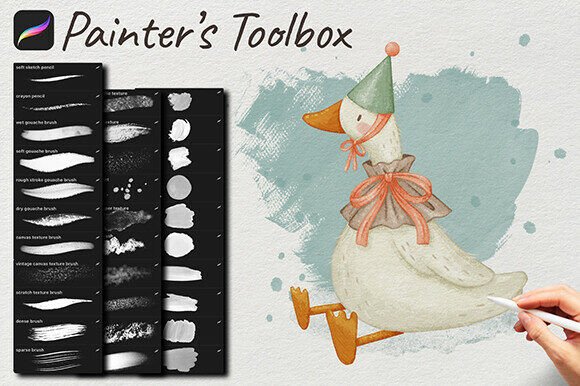
The Painter’s Toolbox comes as a single .brushset file, making installation straightforward and hassle-free. Inside, you’ll find a well-curated collection of brushes, including:
- 2 Pencil Brushes – Ideal for sketching and outlining with precision.
- 5 Filler Brushes – Perfect for covering large areas with smooth, consistent strokes.
- 14 Texture Brushes – Great for adding depth and realism to your artwork.
- 10 Stamp Brushes – Useful for repeating patterns or adding unique design elements quickly.
This variety ensures that artists have the flexibility to work across different styles and techniques without needing to switch between multiple brush packs.
Installation Guide for Easy Setup
Installing the Painter’s Toolbox – Procreate Brushes is simple, though the process may vary slightly depending on your device. After purchasing, you'll receive a zip file containing the brushes. Here’s how to install them:
- Windows Users: Download the zip file, extract it, and upload the contents to cloud storage like Dropbox or iCloud. Then, use the Files app on your iPad to drag the brushes into Procreate.
- Mac Users: Download and unzip the file, then use AirDrop to send the brushes directly to your iPad for quick installation.
- iPad Only: Use any zip-opening app to extract the files, then transfer the brushes into Procreate via the Files app.
Make sure your iPad is running the latest version of iOS and that you have Procreate 5 or higher installed to ensure compatibility.
Who Can Benefit from Painter’s Toolbox?
The Painter’s Toolbox – Procreate Brushes is designed for a wide audience, including:
- Professional Artists: Those who need reliable, high-quality brushes for client work or personal projects.
- Illustrators: Ideal for creating detailed illustrations for books, comics, or digital media.
- Designers: Useful for crafting digital assets, logos, and branding materials with texture and depth.
- Hobbyists: A great addition for anyone exploring digital art as a creative outlet.
Whether you're creating concept art, character designs, or digital paintings, this brushset provides tools that adapt to your workflow.
Real-World Applications and Use Cases
Let’s explore how the Painter’s Toolbox – Procreate Brushes can be used in practical scenarios:
- Comic Book Art: Use the pencil brushes for clean linework, filler brushes for inking, and texture brushes to add dramatic shading and effects.
- Product Design Sketches: Stamp brushes can be used to add consistent textures or patterns to design mockups quickly.
- Digital Portraits: Combine pencil brushes for outlines with texture brushes to simulate skin tones, fabric, or hair details.
- Pattern Creation: Stamp brushes allow for seamless pattern design, useful for textiles, backgrounds, or UI elements.
These examples show how the brushset can support a wide range of artistic and design goals, making it a versatile addition to any digital artist’s toolkit.
Strengths of the Painter’s Toolbox
Several features make the Painter’s Toolbox – Procreate Brushes stand out:
- Comprehensive Set: With 31 brushes across four categories, it offers a well-rounded selection for most digital art tasks.
- Easy Installation: The single .brushset file simplifies setup, saving time and reducing technical hurdles.
- High Compatibility: Designed for Procreate 5 and later, ensuring optimal performance on updated iOS devices.
- Artistic Flexibility: From sketching to texturing, the brushes cater to various stages of the creative process.
Considerations and Limitations
While the Painter’s Toolbox is a powerful resource, there are a few things to keep in mind:
- Procreate-Only Compatibility: These brushes are specifically designed for the Procreate app and won’t work in other digital art software.
- Learning Curve: New users may need time to explore and understand how each brush performs under different settings.
- Device Requirements: Ensure your iPad supports the latest version of Procreate and has sufficient storage space for the brushset.
These considerations are important when evaluating whether this brushset aligns with your current tools and experience level.
Evaluating Suitability for Your Projects
Before purchasing the Painter’s Toolbox – Procreate Brushes, ask yourself the following:
- Do you use Procreate regularly? If you’re already invested in the app, this brushset will enhance your workflow.
- Are you looking for a versatile set of brushes? This kit covers sketching, filling, texturing, and stamping, so it’s ideal if you need variety.
- Do you need high-quality textures and stamps? The texture and stamp brushes are particularly useful for adding visual interest and detail.
If the answer is yes to any of these questions, the Painter’s Toolbox is likely a great fit for your creative needs.
Final Thoughts
The Painter’s Toolbox – Procreate Brushes is more than just a collection of digital brushes — it’s a thoughtfully designed toolkit that empowers artists to create with greater efficiency and creativity. Whether you're working on detailed illustrations, designing digital assets, or simply experimenting with new styles, this brushset offers the tools you need to bring your vision to life.
With its user-friendly installation, broad brush selection, and real-world applicability, the Painter’s Toolbox is a valuable asset for any Procreate user looking to expand their digital art capabilities.