Building Patterns 2.0 Procreate Brushes: Enhancing Digital Art with Seamless Design Tools
What Are Building Patterns 2.0 Procreate Brushes?
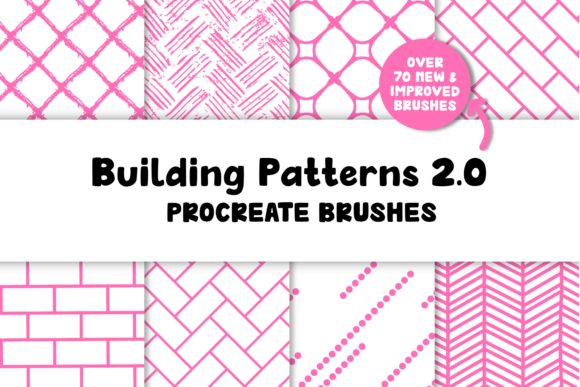
For digital artists and illustrators using Procreate, the Building Patterns 2.0 Procreate Brushes pack is a powerful creative resource designed to streamline the process of incorporating seamless textures and patterns into artwork. This updated brush set offers a wide range of pattern options, including bricks, tiles, wallpapers, and more, all optimized for ease of use and visual impact.
Containing 79 different brushes, the set is organized into sub-categories for intuitive navigation. The brushes are delivered in a single .brushset file, along with a detailed .pdf guide that explains how to adjust brush size and maximize the functionality of each pattern. At just 38.6 MB, the download is compact and efficient, making it accessible for artists of all experience levels.
Why Artists Need Seamless Pattern Brushes
Creating detailed textures from scratch can be time-consuming, especially for digital artists working under tight deadlines or looking to maintain a consistent visual style. Whether you're designing architectural illustrations, creating background textures for comics, or adding depth to interior design concepts, the right tools can make all the difference.
This is where the Building Patterns 2.0 Procreate Brushes come into play. These brushes offer a practical solution for artists who want to incorporate professional-grade patterns without the hassle of manually repeating and aligning designs. Each brush is designed to be seamless, ensuring that strokes blend smoothly without visible seams or disruptions in the pattern flow.
How Building Patterns 2.0 Improves Your Workflow
One of the standout features of this updated brush pack is its focus on usability. While earlier versions may have required more manual tweaking, Building Patterns 2.0 introduces enhanced brush functions that simplify the application of patterns. Artists can now focus more on composition and creativity, rather than technical adjustments.
For example, if you're illustrating a scene with a brick wall, instead of drawing each brick individually or using a texture overlay, you can simply select a brick pattern brush and paint directly onto your canvas. The pattern flows naturally with your stroke, adapting to curves and angles in a way that feels organic and intuitive.
Practical Applications Across Creative Fields
The versatility of the Building Patterns 2.0 Procreate Brushes makes them suitable for a wide range of creative disciplines:
- Architectural Illustration: Quickly add realistic brick, stone, or tile textures to building facades and floor plans.
- Comic and Concept Art: Use pattern brushes to create richly detailed environments without slowing down your workflow.
- Interior Design: Visualize different wallpaper, flooring, and fabric options directly within your digital sketches.
- Product Design: Apply surface textures to mockups and prototypes for a more polished presentation.
Each of these use cases benefits from the time-saving nature of the brushes. Artists can experiment with different textures and layouts more freely, allowing for greater creative exploration and iteration.
What to Know Before You Start
Before diving into the brush set, it’s important to understand a few key points. First, these brushes are only compatible with Procreate 5 or higher, and they will not function in other applications. Additionally, while the brushes themselves are seamless, they cannot be used to create seamless repeat patterns across a canvas — a limitation of Procreate’s brush engine rather than the brushes themselves.
For best results, it’s recommended to use a compatible Apple Pencil, which offers pressure sensitivity and tilt recognition for more natural brush behavior. This enhances the control you have over each stroke, making it easier to apply patterns with precision and nuance.
Getting the Most Out of Building Patterns 2.0
While the brushes are designed for ease of use, there are a few tips that can help you maximize their potential:
- Experiment with brush size: Adjusting the size of the pattern can dramatically change the look of your artwork. The included PDF guide explains how to scale patterns effectively.
- Layer for depth: Combine multiple pattern brushes to create complex surfaces, such as aged brick with moss or tiled floors with grout lines.
- Customize colors: Since the brushes are grayscale, you can easily recolor them using Procreate’s blending modes or adjustment tools to match your palette.
- Use clipping masks: Apply patterns to specific shapes or objects without overpainting by using clipping masks for clean, editable results.
Who Will Benefit Most from These Brushes?
While the Building Patterns 2.0 Procreate Brushes are a valuable asset for any digital artist, they are especially useful for:
- Concept artists: Looking to quickly build environments with detailed surfaces.
- Illustrators: Who need to add texture without compromising on speed or style.
- Designers: Creating mockups or visualizations where surface detail enhances realism.
- Beginners: Learning how to incorporate textures into their work without complex workflows.
Each of these users approaches digital art with different goals, but all can benefit from the efficiency and flexibility that Building Patterns 2.0 brings to the table.
Final Thoughts
In the ever-evolving world of digital art, having the right tools can make a significant difference in both productivity and creative expression. The Building Patterns 2.0 Procreate Brushes provide a seamless, intuitive way to incorporate professional-grade textures into your work — without the frustration of manual pattern creation.
Whether you're a seasoned illustrator or just starting out, this brush set offers a practical solution for enhancing your digital projects with rich, detailed surfaces. By streamlining the process of adding texture, it allows you to focus more on your vision and less on the technical details, helping you bring your ideas to life with confidence and clarity.