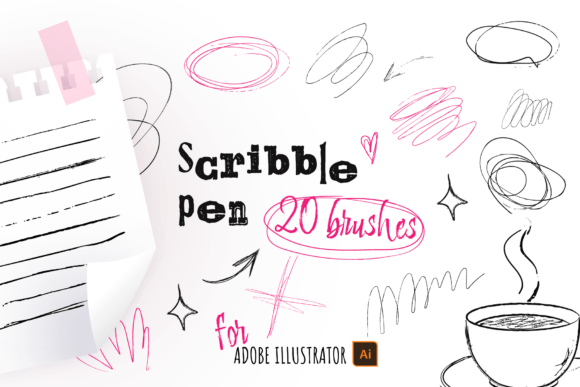
20 Scribble Ink Pen Brushes for AI
Bring Handcrafted Energy to Your Adobe Illustrator Projects
Adobe Illustrator users who crave the organic texture of hand-drawn ink lines can now achieve that look with precision and flexibility using the 20 Scribble Ink Pen Brushes for AI. This brush set offers a curated collection of vector-based tools that mimic the subtle imperfections and expressive flow of real ink strokes. Whether you're sketching ideas, refining illustrations, or designing for print and digital, these brushes bridge the gap between analog charm and digital control.
Why These Brushes Stand Out
Unlike standard vector strokes that can feel rigid or overly clean, these 20 brushes bring a natural, humanized quality to your lines. Each brush is crafted to replicate the texture and variation of real ink on paper—complete with slight irregularities, tapering ends, and soft edges. The result is a design that feels more approachable, personal, and alive.
- 20 unique vector brushes designed for Adobe Illustrator Desktop (Mac and Windows)
- Versatile stroke weights—from fine pen lines to bold ink marks
- Includes an AI file with all brushes pre-loaded and ready to use
- Comes with a PDF installation guide for easy setup
These brushes are not supported in the iPad version of Illustrator, so they're best suited for desktop-based workflows.
Creative Applications Across Design Fields
From concept sketches to final presentations, the 20 Scribble Ink Pen Brushes open up a wide range of creative possibilities. Here’s how different creators can use them effectively:
Illustrators and Concept Artists
Use the brushes to develop rough thumbnails or final inked illustrations. The natural variation in line weight and texture adds visual interest and depth. Try layering different brushes to simulate ink washes or combine with watercolor textures for mixed-media effects.
Graphic Designers and Branding Experts
Incorporate scribble ink elements into logo concepts, packaging designs, or brand assets to add a personal, artisanal touch. These brushes are ideal for creating custom icons, hand-drawn dividers, or stylized annotations that stand out in editorial layouts or promotional materials.
Marketers and Content Creators
Add a human feel to infographics, social media visuals, or presentation slides. Scribbled arrows, callouts, or handwritten-style captions can make data feel more approachable and engaging. Use them to highlight key points in reports, blog graphics, or explainer visuals.
Educators and Presenters
These brushes are perfect for creating visual aids, whiteboard-style diagrams, or interactive learning materials. The hand-drawn aesthetic can help simplify complex ideas and keep learners visually engaged without overwhelming them with overly technical visuals.
Practical Tips for Best Results
While the brushes are easy to install and use, a few smart practices can help you get the most from them:
- Experiment with stroke weight: Start with thinner strokes for a clean pen look, then increase the weight for bolder, ink-heavy lines.
- Customize with effects: Combine brushes with Illustrator’s built-in effects like Gaussian Blur or Grain to enhance the organic feel.
- Group and layer: Layer multiple brush strokes with varying opacity and blending modes to build depth and texture.
- Test on different backgrounds: Try your ink strokes on light, dark, or textured backgrounds to see how they interact visually.
- Use in combination with other tools: Pair these brushes with hand-drawn fonts, vector textures, or scanned ink elements for a cohesive style.
Adapting for Different Audiences and Formats
One of the strengths of this brush set is its flexibility across design contexts. Here are a few ways to tailor its use:
- For Children’s Books: Use the playful, sketchy quality of the brushes to create whimsical characters, expressive backgrounds, or storyboarding visuals.
- For Product Packaging: Incorporate subtle ink textures into labels or brand illustrations to give your product a handcrafted, boutique feel.
- For Poster Design: Combine bold ink strokes with typography to create dynamic, eye-catching compositions that feel spontaneous yet intentional.
- For Digital Illustration: Use the brushes to simulate hand-inked linework before coloring digitally—ideal for comics, editorial illustrations, or digital journals.
Designing with Intention and Clarity
While the scribble ink aesthetic is expressive, it's important to maintain clarity and intention in your design. Overusing textured strokes can lead to clutter or visual confusion. Here are a few strategies to keep your work clean and effective:
- Limit brush variety per project: Stick to a small selection of brushes to maintain consistency in line style and texture.
- Balance with clean elements: Counterbalance hand-drawn strokes with clean typography, solid shapes, or minimalist layouts.
- Use alignment and spacing: Even organic lines benefit from thoughtful composition. Keep your layouts visually balanced and readable.
- Export strategically: When exporting for web or print, test different resolutions and file formats to preserve the brush texture without compromising quality.
Final Thoughts
The 20 Scribble Ink Pen Brushes for AI are more than just a design tool—they’re a way to infuse personality and authenticity into your creative work. Whether you're illustrating, branding, teaching, or presenting, these brushes offer a flexible, expressive way to connect with your audience. With a little experimentation and thoughtful application, you can turn digital lines into something that feels truly handcrafted and meaningful.