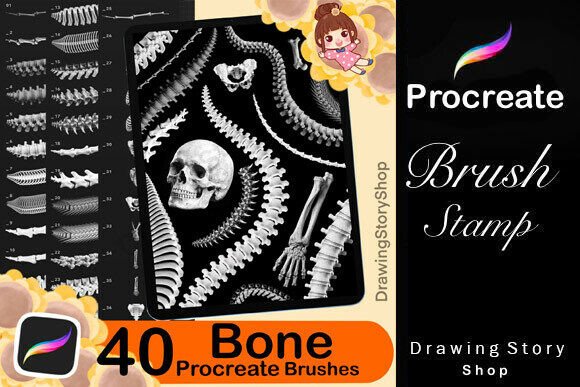
40 Procreate Bone Skeleton Brushes for Dark Art and Gothic Illustration Workflows
The 40 Procreate Bone Skeleton Brushes set is a specialized toolkit designed for digital artists who work within dark art, gothic illustration, and anatomical reference projects. These brushes, built specifically for the Procreate app on iPad, offer a streamlined way to incorporate skeletal elements—skulls, spines, and full bone structures—into your digital illustrations with precision and efficiency.
How These Brushes Fit Into a Creative Workflow
For illustrators, concept artists, and designers working on dark-themed or medically inspired visuals, time and consistency are crucial. The 40 Procreate Bone Skeleton Brushes set simplifies the process of integrating anatomical references by eliminating the need to draw complex bone structures from scratch. This makes it an ideal resource during the early sketching phase, mid-illustration refinement, or even in final detailing stages where anatomical accuracy or stylized skeletal motifs are required.
Compatibility and Setup
After purchase, users receive immediate access to the brush set along with a PDF guide explaining how to import the brushes into Procreate. This ensures a smooth onboarding experience, even for those who are less technically inclined. The brushes are optimized for use on iPad with the Apple Pencil, making them ideal for artists who already have a digital workflow built around Procreate’s interface.
Use Cases Across Artistic and Commercial Projects
These brushes are not limited to fine art illustration. They can be used effectively in commercial digital product creation such as:
- Digital prints for niche markets
- Social media graphics with gothic themes
- Custom stickers and apparel designs
- Educational anatomy visuals for artists or students
Because the brushes are stamps and not full vector assets, they blend naturally into Procreate’s layer-based system, allowing for easy color adjustments, blending modes, and texture overlays without disrupting the original brush behavior.
Integration with Other Tools and Resources
When used alongside traditional illustration brushes, texture packs, or lighting effects in Procreate, the 40 Procreate Bone Skeleton Brushes can become part of a layered, cohesive design system. For example, a digital artist working on a Halloween-themed poster might use these brushes to quickly add skeletal motifs, then enhance them with lighting effects and custom textures from other brush sets.
Efficiency and Consistency in Production
One of the key advantages of using this brush set is the ability to maintain visual consistency across multiple illustrations. Whether you're creating a series of themed artwork or designing for a brand identity that leans into gothic aesthetics, having pre-configured bone brushes ensures that each skeletal element aligns with the same visual language.
Practical Implementation Tips
Here are a few ways to incorporate the 40 Procreate Bone Skeleton Brushes into your creative process:
- Thumbnail Sketching: Use the brushes during the early layout phase to block in skeletal forms or anatomical references before committing to detailed linework.
- Texture Layering: Apply bone textures over painted backgrounds or under transparent overlays to create depth and thematic cohesion.
- Batch Illustration: For artists producing multiple illustrations with similar motifs, these brushes reduce repetitive drawing and help maintain uniformity.
- Color Testing: Because the brushes are grayscale, they allow for easy colorization using Procreate’s adjustment tools. Test different color palettes without redrawing each element.
Quality Control and Long-Term Use
Since these brushes are created specifically for Procreate, they maintain high fidelity and performance across different iPad models and stylus inputs. It’s recommended to organize them into a dedicated brush group within Procreate for easy access and to avoid cluttering your main brush library. Regularly backing up your brush set ensures that you don’t lose access if you need to reset or switch devices.
Usage Rights and Commercial Application
The licensing terms allow for broad creative freedom. Users can incorporate these brushes into both personal and commercial work, including digital prints, stickers, and social media graphics. However, it's important to note that the brushes themselves cannot be resold or redistributed as standalone files. This means you can use them to create and sell original artwork, but not to compile and sell brush sets or digital stamps containing these assets.
Workflow Integration Example
Imagine a freelance illustrator working on a commissioned series of dark art prints for an online store. The process might look like this:
- Research and Planning: Gather anatomical references and define the visual direction.
- Sketching: Use the bone brushes to quickly block in skull or spine structures as foundational elements.
- Detailing: Layer traditional brushes over the stamped elements to refine form and add artistic expression.
- Coloring: Apply color using Procreate’s adjustment tools or layer styles directly over the stamped bones.
- Exporting: Prepare final files for print-on-demand platforms or digital download stores.
This kind of structured workflow not only speeds up production but also ensures that each illustration maintains a consistent visual theme and quality standard.
Conclusion
The 40 Procreate Bone Skeleton Brushes are more than just a novelty—they are a practical tool for any digital artist looking to streamline the integration of anatomical or gothic elements into their work. Whether you're creating concept art, designing digital products, or illustrating educational material, these brushes offer a flexible, efficient, and visually compelling solution that fits naturally into modern digital workflows.