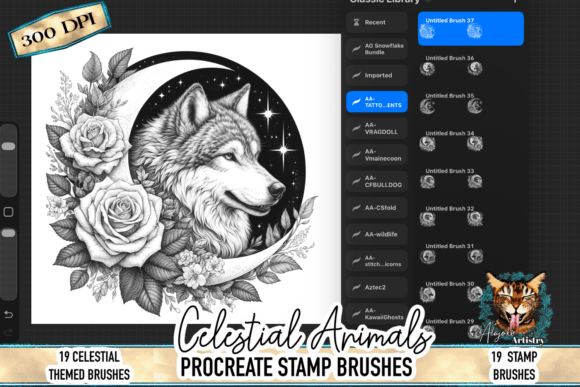
Celestial Wolf Procreate Stamp Brushes: Enhancing Your Digital Art with Fantasy and Precision
What Are Celestial Wolf Procreate Stamp Brushes?
The Celestial Wolf Procreate Stamp Brushes offer digital artists a powerful tool for creating mystical, fantasy-themed artwork with ease. This brush pack features a high-resolution spirit wolf design surrounded by celestial elements like moonlight, stardust, and glowing energy. Designed specifically for use on the iPad within the Procreate app, this stamp brush allows artists to place a beautifully detailed centerpiece into their work with a single tap. Whether you're illustrating fantasy scenes, designing book covers, or creating digital journals, the Celestial Wolf brush adds a touch of ethereal beauty and symbolic depth to your compositions.
Common Misconceptions and Mistakes to Avoid
While the Celestial Wolf Procreate Stamp Brush is intuitive and powerful, some users may overlook key details that affect the final output of their artwork. Understanding these pitfalls can help you make the most of this creative tool.
1. Assuming the Brush Works the Same on All Devices
Although the brush is optimized for iPad use with Apple Pencil support, some users mistakenly assume it will perform equally well on other tablets or desktop software. The brush is specifically built for Procreate's interface and gesture controls, so attempting to use it outside this environment may lead to inconsistent results or incompatibility issues.
Better Approach: Always confirm you're using the latest version of Procreate on a compatible iPad model. This ensures smooth integration and optimal performance with the Celestial Wolf Procreate Stamp Brush.
2. Ignoring Resolution and Scaling Limits
While the brush offers high-resolution output, some artists attempt to scale the stamp far beyond its intended size, resulting in pixelation or loss of clarity. The brush is designed for clean, detailed placement at standard proportions, but extreme resizing without adjusting layers or using vector-based overlays can degrade image quality.
Better Approach: Use the brush at its recommended scale or duplicate the stamp on a separate layer before resizing. This preserves the original quality and allows for more precise adjustments using Procreate's transform tools.
3. Overlooking Customization Potential
Some users apply the stamp as-is and miss the opportunity to personalize it. The Celestial Wolf Procreate Stamp Brush is meant to be a starting point — not a final product. Artists who skip adding color overlays, glow effects, textures, or blending modes may end up with flat, uninspired results.
Better Approach: Experiment with Procreate's layer blending modes, gradient maps, and texture brushes to enhance the wolf's glow and integrate it seamlessly into your background. Try using soft light or overlay modes to make the celestial elements pop.
4. Not Checking Compatibility Before Purchase
Since the brush is a digital download and optimized for iPad use, some buyers mistakenly assume it works with other digital art platforms like Photoshop, Clip Studio Paint, or Krita. This can lead to frustration when the .brushset file doesn’t open in unsupported apps.
Better Approach: Always verify that you're purchasing a Procreate-exclusive brush and that you have access to the Procreate app. If you're new to Procreate, consider downloading a free brush sample before investing in premium packs.
What to Check Before Using the Celestial Wolf Procreate Stamp Brush
Before diving into your project, take a moment to ensure everything is set up correctly for the best possible experience with the Celestial Wolf Procreate Stamp Brush.
- Procreate Version: Confirm your app is updated to the latest version to avoid compatibility issues.
- iPad Model: Check that your iPad supports the latest version of Procreate, especially if you're using an older device.
- Brush Installation: Make sure the .brushset file is imported correctly into the Brushes section of Procreate.
- Layer Setup: Use a dedicated layer for the stamp to allow for non-destructive editing and easy adjustments later.
Realistic Examples of Effective Use
Consider a digital artist working on a fantasy-themed planner layout. They might place the Celestial Wolf Procreate Stamp Brush in the corner of the page, then add a soft gradient overlay and a faint star texture to enhance the mystical vibe. By adjusting the brush’s color using layer masks, they can match the overall color scheme of the planner without losing the original glow effect.
Another example is a concept artist designing a book cover. They might use the wolf as a central figure, then duplicate the stamp across multiple layers to create a dynamic composition. Adding motion blur and light streaks around the wolf can give the image a sense of movement and magic, making the cover more visually compelling.
Final Thoughts: Making the Most of Your Celestial Wolf Brush
The Celestial Wolf Procreate Stamp Brush is a versatile and visually striking tool that can elevate your digital art quickly. However, like any creative asset, its effectiveness depends on how thoughtfully you use it. By avoiding common mistakes, understanding its limitations, and embracing its customization options, you can create artwork that feels both mystical and personal.
Remember, the goal is not just to place a beautiful image, but to integrate it into your vision. Whether you're creating social media graphics, spiritual art, or fantasy illustrations, the Celestial Wolf Procreate Stamp Brush is a valuable addition to your toolkit — as long as you use it wisely.