Enhance Your Digital Art with the Glitter Procreate Brushes Set - Pack 1
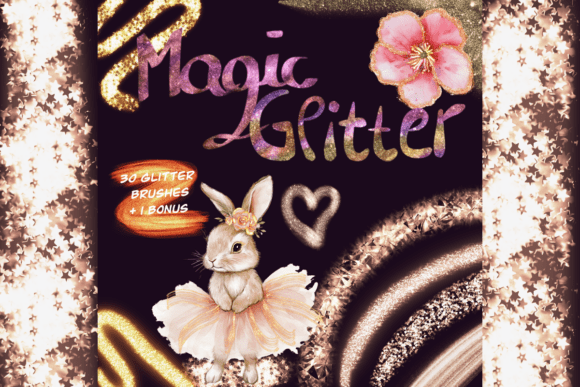
For digital artists seeking to elevate their work with a touch of brilliance, the Glitter Procreate Brushes Set - Pack 1 offers a compelling solution. Designed specifically for Procreate users, this pack brings a curated collection of 30 glitter brushes and one exclusive bonus brush, each crafted to add shimmer, sparkle, and dimension to your digital creations. Whether you're lettering, illustrating, or simply enhancing your digital compositions, this brush set opens up a world of creative possibilities.
What Makes the Glitter Starter Pack Stand Out?
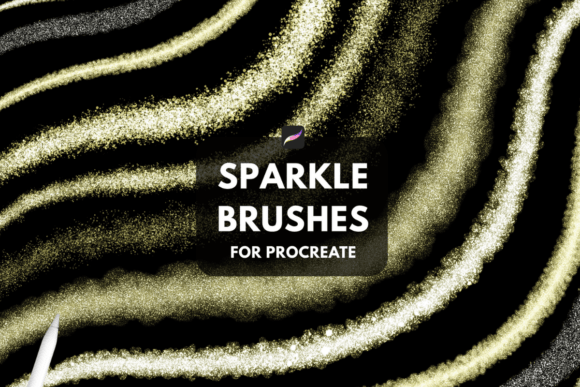
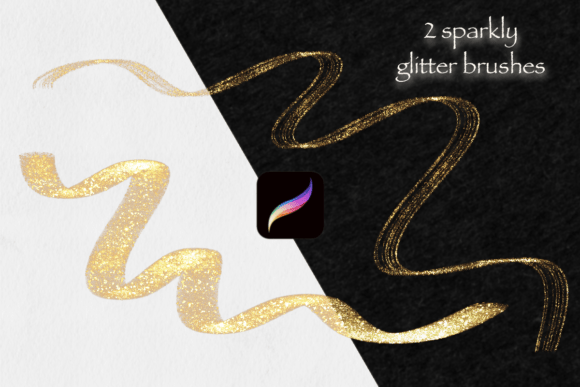
The Glitter Procreate Brushes Set - Pack 1 isn’t just about adding visual flair—it’s about giving your artwork a dynamic edge. Each brush in the collection is designed with unique textures and varying spark intensities, allowing for both subtle highlights and bold, eye-catching effects. The pack includes a bonus brush that offers an exclusive sparkle pattern, making it a valuable addition to your digital toolkit.
Additionally, the set comes with three vibrant, handpicked color palettes. These swatches are not only aesthetically pleasing but also practical, enabling artists to experiment with color harmonies that enhance the glitter effects. Whether you're a seasoned professional or a beginner exploring the world of digital art, these palettes can streamline your creative process and inspire new ideas.
Practical Applications Across Creative Fields
- Lettering and Typography: Use glitter brushes to accentuate letterforms, create glowing text effects, or design festive typography for social media posts, invitations, or branding materials.
- Illustration and Concept Art: Add magical elements to fantasy scenes, create sparkling backgrounds, or highlight specific features in your characters or environments.
- UI/UX Design: Incorporate subtle shimmer effects into app interfaces, website buttons, or animated elements to enhance user engagement.
- Print and Merchandise Design: From greeting cards to stickers, glitter effects can make print designs pop and attract attention in competitive markets.
Getting Started: Installation and Setup
Using the Glitter Procreate Brushes Set - Pack 1 is straightforward. After purchasing, you’ll receive a .brushset file that you can download directly to your iPad. Once downloaded, simply tap the file, and it will automatically import into Procreate. Open the app and navigate to the Brush Library—your new brushes will be organized in a dedicated folder for easy access.
While the brushes are fully compatible with Procreate, using an Apple Pencil is recommended to take full advantage of pressure sensitivity and precise control. This ensures that each glitter stroke responds naturally to your touch, giving your artwork a more organic and polished appearance.
Why Artists Love This Brush Set
One of the standout features of this glitter brush collection is its versatility. Artists can seamlessly transition from soft, ambient shimmering effects to bold, trail-like sparkles that command attention. This flexibility makes the pack suitable for a wide range of artistic styles and project types.
Moreover, the inclusion of three colorful palettes removes the guesswork from color selection. These palettes are thoughtfully curated to complement glitter effects, ensuring your artwork maintains visual harmony while still standing out. Whether you're working on a whimsical illustration or a sleek digital design, these color swatches can enhance your workflow and elevate your final output.
Who Should Use the Glitter Starter Pack?
The Glitter Procreate Brushes Set - Pack 1 is ideal for a broad audience:
- Professional Artists: Looking to add high-impact effects to client work or personal projects.
- Content Creators: Enhancing digital illustrations for blogs, social media, or digital marketing materials.
- Educators and Tutors: Teaching digital art techniques in a visually engaging way.
- Hobbyists: Exploring new creative avenues with accessible, user-friendly tools.
- Business Owners: Designing branded assets with a touch of sparkle for product packaging, advertisements, or promotional content.
Real-World Examples of Glitter Brush Use
Consider a digital illustrator working on a fantasy-themed project. By using the bold spark trail brushes, they can create dramatic magical effects around a spellcasting character. Alternatively, a designer crafting a wedding invitation might use the soft shimmer brushes to add a luxurious glow to calligraphy or floral accents.
In digital scrapbooking or planner design, glitter brushes can be used to highlight important dates or create festive borders. Even in animation concept art, these brushes can help visualize lighting effects or magical elements that would later be translated into motion graphics.
Optimizing Performance and Workflow
When working with glitter brushes, layer management is key. It’s often best to apply glitter effects on separate layers so they can be adjusted independently. This allows for greater control over opacity, blending modes, and overall composition balance.
Additionally, experimenting with different brush settings—such as grain, scattering, and wet mix—can yield unique results. Don’t be afraid to tweak the default settings to better suit your artistic vision. The Glitter Procreate Brushes Set - Pack 1 is designed to be flexible, encouraging customization to match your individual style.
Final Thoughts on the Glitter Starter Pack
In a digital art landscape where subtle details can make a significant impact, the Glitter Procreate Brushes Set - Pack 1 offers a powerful yet accessible way to enhance your work. Its combination of diverse brushes, intuitive usability, and stunning visual effects makes it a must-have for any Procreate user looking to add a little sparkle to their creative process.
Whether you're aiming for a soft shimmer or a dazzling trail of light, this brush set provides the tools you need to bring your artistic vision to life. With easy installation, compatibility across Procreate versions, and thoughtful design, the Glitter Starter Pack is more than just a collection of brushes—it's a creative companion for digital artists at every skill level.