Number Charts Affinity Brushes PNGs: Creative Tools for Designers
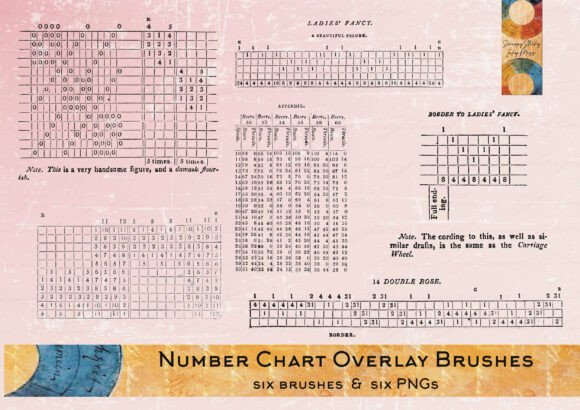
Whether you're crafting digital art, designing marketing materials, or creating content for social media, the right tools can elevate your work. The Number Charts Affinity Brushes PNGs offer a unique blend of vintage charm and modern flexibility. Inspired by a vintage weaving chart book, these brushes and stamps provide a tactile, handcrafted feel to digital designs. They’re perfect for layering, blending, and customizing to suit your creative vision.
What Makes Number Charts Affinity Brushes PNGs Unique?
These digital brushes and PNGs stand out due to their origin and adaptability. Each design was drawn from a historical weaving chart, giving them a distinctive texture and visual rhythm. The set includes six text brushes compatible with Affinity Photo and Affinity Designer, along with corresponding PNG files for users who prefer other design platforms.
The brush files are optimized for use in Affinity’s Pixel Persona, ensuring seamless integration into your workflow. If you're not using Affinity, the PNG versions are easy to import, resize, and recolor in any image-editing software. This dual-format approach makes the set accessible to a wide range of creators, from illustrators to social media managers.
Creative Possibilities with Number Charts Brushes
Because of their textured, hand-drawn quality, these brushes and stamps can be used across a variety of creative projects. Here are a few ideas to spark your imagination:
- Pattern Design: Layer the stamps to create intricate backgrounds or repeating motifs for fabric, stationery, or packaging design.
- Digital Collage: Blend the vintage-inspired textures with modern graphics or photographs to add depth and contrast.
- Typography Art: Use the text brushes to build word-based illustrations or stylized quotes that stand out on posters or blog graphics.
- Journaling & Planners: Enhance digital bullet journals or planner pages with these organic, handcrafted elements for a personal touch.
- Brand Identity: Incorporate the stamps into logo designs or social media templates to give your brand a unique, artisanal feel.
Customization Tips for Best Results
One of the biggest advantages of the Number Charts Affinity Brushes PNGs is their flexibility. Here’s how you can get the most out of them:
- Adjust Colors: Recolor the PNGs to match your project’s palette using layer blending modes or hue/saturation adjustments.
- Scale Thoughtfully: Resize the brushes or PNGs while maintaining clarity—especially important when using them in print or high-resolution web graphics.
- Combine with Other Elements: Don’t be afraid to mix these with other textures or fonts to create a layered, dynamic composition.
- Organize Layers: Keep your project files clean by labeling and grouping brush layers or PNG elements for easy editing later.
Who Can Benefit from These Brushes?
This set is ideal for a broad range of users. Here’s how different creators can apply it:
- Graphic Designers: Use the brushes to add subtle textures to branding assets, posters, or editorial layouts.
- Bloggers & Content Creators: Spruce up your blog headers, infographics, or Pinterest graphics with a vintage-inspired look.
- Entrepreneurs: Enhance product packaging mockups or promotional materials with a handmade aesthetic that appeals to niche markets.
- Educators: Create engaging visual aids or printable worksheets that feel more personal and tactile.
- Hobbyists: Whether scrapbooking digitally or designing greeting cards, these brushes offer an easy way to add character to your creations.
Installation and Usage Notes
Getting started with the Number Charts Affinity Brushes PNGs is simple. The download includes a .afbrushes file for use in Affinity Photo or Designer. For those using other software, the included PNGs can be imported directly. A quick reference sheet is provided to guide installation steps for Affinity users.
If the download arrives in a compressed folder, you may need to use a free unzipping tool such as 7-Zip or WinRAR to access the files. Once unzipped, you can begin experimenting with the brushes or PNGs right away.
How to Keep Your Design Work Cohesive
When working with textured or vintage-style elements like these, it’s important to maintain balance in your design. Too many contrasting textures can make a layout feel cluttered. Here are a few tips to keep your work clean and audience-friendly:
- Limit Your Palette: Stick to 2–3 main colors to let the textures stand out without overwhelming the viewer.
- Choose Complementary Fonts: Pair the text brushes with modern sans-serif or minimalist script fonts to create visual contrast.
- Use Opacity Wisely: Lower the opacity of layered elements to create subtle background textures without distracting from the main message.
- Maintain Consistency: If you’re creating a series (like social media posts or a product line), use the brushes in a consistent way to reinforce your visual identity.
Final Thoughts
The Number Charts Affinity Brushes PNGs offer more than just decorative flair—they’re a versatile toolkit for adding depth, personality, and a touch of history to your digital creations. Whether you're a professional designer or a hobbyist exploring digital art, this set gives you the flexibility to experiment while maintaining a cohesive, polished look.
By understanding how to integrate and customize these elements, you can bring a fresh, handcrafted dimension to your work—without sacrificing clarity or design integrity. Try incorporating them into your next project and see how they can transform your creative output.