Procreate Isometric Map Creator Brushes: Designing Cozy Towns and Detailed Scenes with Ease
If you're an illustrator, game designer, or digital artist looking to create charming isometric maps directly on your iPad, the Procreate Isometric Map Creator Brushes pack is a powerful tool to have in your creative arsenal. With 91 high-quality stamp brushes, this set empowers artists to build intricate cityscapes, cozy neighborhoods, and detailed public spaces with a clean, cohesive aesthetic—all from the convenience of the Procreate app.
What Makes These Brushes Unique?
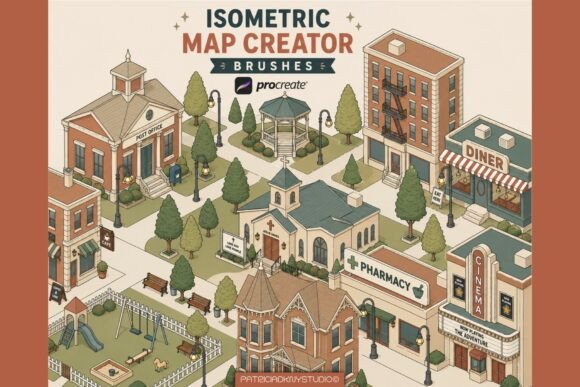
Unlike generic brush sets, the Isometric Map Creator Brushes are specifically designed for drag-and-drop efficiency while maintaining a consistent isometric perspective. Whether you're crafting a Victorian neighborhood, a bustling café district, or a peaceful park, each brush stamp aligns perfectly with the others, ensuring your scenes look intentional and professional.
The pack includes a wide variety of assets:
- Vintage and modern Victorian houses
- Shops and restaurants with detailed facades
- Public buildings like hospitals and fire stations
- Trees, nature elements, and outdoor scenery
- Urban props such as benches, lampposts, and playgrounds
- Decorative accents for added charm and character
Each brush is optimized for clarity and precision, featuring crisp linework that holds up well even at larger sizes. This makes them ideal for both digital illustration and print-ready artwork.
Perfect for a Wide Range of Creative Projects
These brushes aren’t just for map-making—they’re versatile enough to support a variety of creative workflows. Here are just a few applications where the Procreate Isometric Map Creator Brushes can shine:
Cozy Map Illustrations
Whether you're designing a whimsical town for a children's book or a detailed fantasy map for a tabletop RPG, these brushes help you build a warm, inviting world with minimal effort. The isometric layout gives depth to your scenes while maintaining a flat, stylized look that's easy to work with.
Storybook Scenes and Visual Narratives
Creating visual stories is easier when you can focus on composition and storytelling rather than drawing every building from scratch. Use these brushes to quickly lay out a town square, a quiet alleyway, or a bustling marketplace—perfect for picture books, comics, or concept art.
Game Concept Art and World Building
For indie game developers or concept artists, isometric design is a popular choice for 2D games. The brushes in this set allow you to prototype game levels, design town layouts, or create background scenes with a consistent visual style that can easily be adapted into game assets.
Planner and Journal Designs
If you're into digital bullet journaling or planner design, these brushes can add a fun, illustrative touch to your pages. Imagine a cozy town scene in your weekly spread or a detailed map for a travel journal—these brushes make it simple to add personality and flair.
Social Media and Print Art
From Instagram posts to printable wall art, these isometric brushes are ideal for creating eye-catching visuals. Their clean, stylized look works well across platforms, and because they're high-quality, they scale beautifully for prints, posters, or digital downloads.
How to Use the Isometric Map Creator Brushes in Procreate
Using these brushes is straightforward, even for beginners. Once installed in Procreate, each brush acts as a stamp—simply tap or drag to place the asset on your canvas. Because they’re designed with a uniform isometric angle, you can layer and arrange them without worrying about perspective inconsistencies.
Here’s a quick workflow tip:
- Start with a base layer of streets or terrain.
- Use the building brushes to add structures, adjusting size and placement as needed.
- Incorporate trees, benches, and other props to add life and detail.
- Use the decorative brushes to add signs, lights, or other finishing touches.
- Add shading or color to bring your scene to life.
Because each brush is pre-styled with clean linework, you can focus on composition and color rather than drawing every element from scratch. This makes the process not only faster but also more enjoyable, especially for those who may not have advanced drawing skills.
Why Artists Love the Isometric Map Creator Brush Pack
One of the standout features of this brush set is its beginner-friendly design. Even if you're new to Procreate or isometric illustration, you'll find that these brushes make it easy to produce professional-looking results. They eliminate the need for complex perspective drawing, allowing you to focus on creativity and storytelling.
Additionally, the entire set is commercial-use friendly, which means you can use the illustrations you create for client work, print-on-demand products, or digital goods. This makes the brush pack a valuable investment for freelance illustrators, content creators, and small business owners alike.
What to Consider Before Purchasing
Before diving in, it’s important to note that these brushes are designed specifically for the Procreate app on iPad. They will not work in Photoshop or other digital art software. If you already own an iPad and use Procreate regularly, this pack is a seamless addition to your toolkit. If not, you’ll need to invest in both the iPad and the app to take full advantage of the brushes.
Also, while the brushes are easy to use, they do require a bit of practice to master. Understanding how to layer and arrange them for maximum visual impact will help you get the most out of the set. Fortunately, there are many online tutorials and resources available for learning isometric design in Procreate.
Real-World Examples of How Artists Are Using These Brushes
Many artists have already embraced the Procreate Isometric Map Creator Brushes for their creative projects. For example, some illustrators use them to design storybook scenes that feature detailed town layouts with charming architecture and lush greenery. Others have used the brushes to create digital maps for fantasy novels, complete with castles, villages, and forests.
In the world of game development, concept artists use these brushes to sketch out isometric game environments before moving into more detailed pixel art or 3D modeling. The ability to quickly prototype scenes helps speed up the design process and allows for more experimentation with layout and structure.
On social media, creators have used these brushes to craft cozy digital art prints that resonate with followers. Whether it's a quaint café scene or a snowy village, the isometric style adds a unique visual flair that stands out in feeds and galleries.
Final Thoughts
The Procreate Isometric Map Creator Brushes offer a powerful and accessible way to create detailed, isometric town scenes without the need for advanced drawing skills. Whether you're illustrating a children's book, designing game environments, or simply enjoying digital art as a hobby, this brush pack gives you the tools to bring your ideas to life with style and efficiency.
With 91 well-designed brushes, a consistent isometric perspective, and a wide range of architectural and natural elements, this set is a must-have for anyone looking to create cozy, detailed maps and scenes directly in Procreate. Easy to use, versatile, and visually appealing, it’s a valuable addition to any digital artist’s toolkit.