Realistic Ink Brushes for Procreate
Bringing Traditional Ink Realism to Digital Art
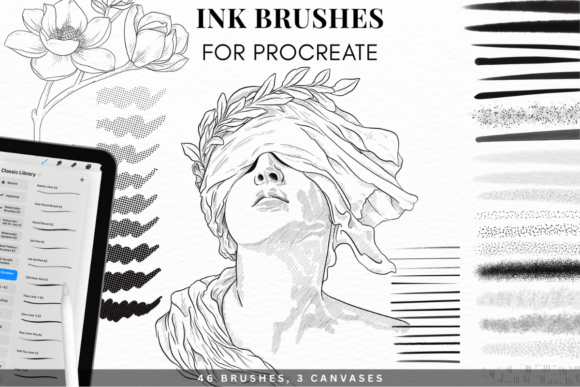
For digital artists who appreciate the depth and character of traditional ink, the Realistic Ink Brushes for Procreate offer a seamless way to replicate that experience on screen. This brush set is designed to mimic the organic textures and fluid blending of real ink washes, making it a valuable tool for illustrators, designers, and creators who want to maintain a hand-crafted feel in their digital work.
Whether you're creating concept art, technical drawings, or atmospheric backgrounds, this kit delivers a level of realism that enhances both the process and the final output. It includes 46 unique brushes that cover a wide range of ink effects—from fine, precise strokes to broad, flowing washes—allowing for expressive flexibility without the mess of physical media.
How Realistic Ink Brushes Improve Your Workflow
One of the standout features of this brush set is its ability to streamline the creative process. Artists who typically spend time adjusting opacity, layer blending, or texture overlays to simulate ink can instead focus on drawing and painting directly. The brushes are pre-configured with realistic grain, bleed, and absorption settings that behave like real paper and ink.
- Consistent texture blending across strokes and layers
- Natural ink diffusion that mimics wet-on-wet watercolor effects
- Customizable pressure response for nuanced linework
This means you can spend less time adjusting settings and more time creating. For professionals working under tight deadlines—like illustrators producing editorial content or concept artists developing storyboards—this efficiency can make a real difference in productivity and quality.
High-Resolution Canvases for Professional Results
The included Magic Canvases are specifically designed to complement the ink brushes, offering a textured surface that enhances the realism of each stroke. Available in two high-resolution sizes—6364×4500 px and 4243×3000 px—at 300 DPI, these canvases are suitable for both print and digital publishing.
For artists preparing work for commercial use, such as book illustrations, posters, or gallery prints, these canvases ensure that the final output maintains a tactile, hand-drawn quality even when scaled up. The texture also helps reduce the "digital" look that can sometimes make work feel flat or overly polished.
Who Benefits Most from This Ink Brush Set?
This kit is especially useful for:
- Traditional artists transitioning to digital who miss the texture and behavior of real ink
- Illustrators needing to produce detailed, expressive linework and atmospheric backgrounds
- Designers integrating hand-drawn elements into branding, packaging, or editorial layouts
- Art educators teaching digital techniques while maintaining a tactile approach
If you're someone who values the expressive qualities of ink but appreciates the flexibility of digital tools, this brush set can bridge the gap between analog and digital workflows.
Installation and Compatibility Made Simple
Getting started with the Realistic Ink Brushes for Procreate is straightforward. The package includes a detailed PDF user guide that walks you through the installation process step by step. Since the brushes are in .brushset format and the canvases in .procreate, importing them into your app is a matter of a few taps.
Designed specifically for Procreate 5 and newer versions, this kit works across all iPad models that support the app. Whether you're using an older iPad or the latest iPad Pro, the brushes are optimized to perform smoothly without lag or inconsistency.
What Sets This Kit Apart from Other Ink Brushes?
Many brush packs claim to offer realistic ink effects, but few deliver the depth and nuance of this collection. Unlike generic brushes that rely on static textures, these are built with dynamic grain and blending behaviors that respond to pressure and speed, just like real ink on paper.
The inclusion of Magic Canvases adds another layer of realism, providing a textured base that enhances ink diffusion and blending. This combination of tools creates a cohesive digital ink studio that feels intuitive and expressive—something that's rare in digital brush sets.
Practical Use Cases for Realistic Ink Brushes
Here are a few scenarios where this brush set can make a meaningful impact:
- Comic book illustration: Use the detailed linework brushes for inking panels and the wash brushes for shading and depth
- Architectural sketches: Combine technical pens with soft ink washes to create realistic renderings
- Character design: Blend expressive strokes with subtle textures to bring characters to life
- Art journaling: Replicate the look of ink and watercolor in a portable, digital format
These examples highlight how the brushes can be used across disciplines—not just for fine art, but for practical design and storytelling applications as well.
Considerations and Limitations
While the Realistic Ink Brushes for Procreate are powerful, they may not be the best fit for every artist. Those who prefer ultra-clean digital lines or minimal texture may find some brushes too organic or unpredictable. Additionally, the high-resolution canvases, while excellent for print, may require more memory and processing power, which could impact performance on older iPad models.
It's also worth noting that while the brushes are pre-configured for realism, achieving the desired effect may still require some experimentation. Like real ink, results can vary based on layer order, blending modes, and brush interaction—so a willingness to explore and adapt is key.
Final Thoughts: A Valuable Addition to Your Digital Toolkit
For artists seeking to bring the expressive qualities of ink into their digital work, the Realistic Ink Brushes for Procreate offer a compelling solution. With a thoughtful selection of brushes, high-quality canvases, and intuitive setup, this kit enhances both the process and the outcome of digital ink painting.
Whether you're a seasoned illustrator or just beginning to explore digital media, this brush set can help you achieve more natural, expressive results with less effort. By bridging the gap between traditional and digital tools, it supports creativity, efficiency, and a more immersive drawing experience.