Watercolor Splatter Brushes: Enhancing Digital Art with Authentic Texture
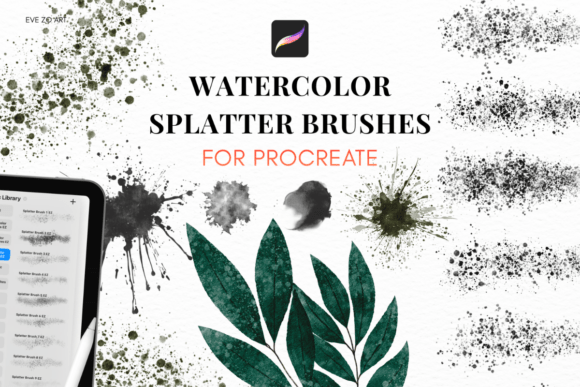
For digital artists seeking to bridge the gap between traditional media and modern tools, Watercolor Splatter Brushes offer a compelling solution. These brushes, specifically designed for use in Procreate, simulate the unpredictable, organic nature of real watercolor splatters. Unlike standard digital brushes that can appear too clean or artificial, Watercolor Splatter Brushes introduce texture, depth, and a sense of spontaneity that can elevate a piece from polished to truly expressive.
What sets Watercolor Splatter Brushes apart is their attention to the physical behavior of watercolor droplets. Each brush in the set emulates different aspects of real-world watercolor techniques—from fine misting effects to broad, sweeping splatters. This realism is achieved through high-resolution textures and carefully tuned brush dynamics that respond naturally to pressure, tilt, and layer interactions within Procreate.
Comparing Watercolor Splatter Brushes with Other Digital Texturing Tools
While many digital art tools offer some form of texture or grain overlay, Watercolor Splatter Brushes differ in both intent and execution. Standard texture brushes often apply a uniform pattern that can feel repetitive or flat. In contrast, these splatter brushes are designed to mimic the chaotic, layered quality of actual watercolor application. This makes them particularly effective for adding depth to backgrounds, enhancing character illustrations, or creating painterly effects without the mess of physical media.
Some digital artists rely on imported scanned textures or photo overlays to achieve similar effects. While this method can yield high-quality results, it often requires additional steps like adjusting blending modes, masking, and scaling. Watercolor Splatter Brushes streamline this process by integrating directly into the drawing workflow. With no need for external image manipulation, artists can apply realistic textures in real time, directly on the canvas.
Key Features and Practical Benefits
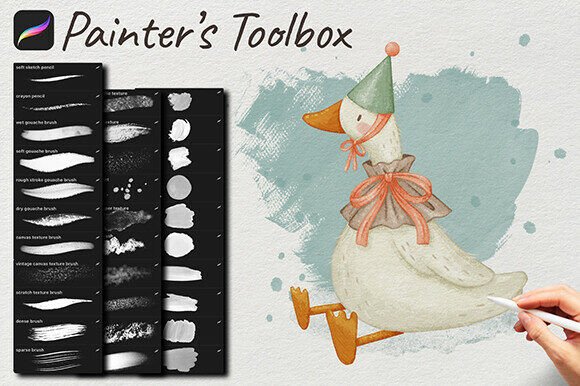
The Watercolor Splatter Brushes pack includes 22 high-resolution brushes, each tailored to a specific type of splatter or texture. From fine speckles to wide, flowing splashes, this variety allows for nuanced control over how texture is applied. The set also includes a detailed PDF user guide, ensuring that even those new to Procreate can quickly understand how to import and use the brushes effectively.
One notable advantage of this brush set is its compatibility with Procreate 5 and newer versions across all iPad models. This ensures broad accessibility, whether working on a basic iPad or a high-end Pro model with Apple Pencil support. The brushes are also optimized for performance, maintaining responsiveness even when layering multiple textures or working at high zoom levels.
Because the brushes rely on high-resolution textures, the download size is relatively large (approximately 2 GB). To accommodate this, users receive either a direct ZIP download or a secure external link embedded in a PDF. This ensures reliable access to the full-resolution files without the risk of corrupted downloads or file size restrictions.
When Watercolor Splatter Brushes Are the Right Choice
These brushes are particularly well-suited for artists who want to infuse their digital work with a tactile, organic feel. Illustrators working on character designs, concept art, or editorial pieces may find that the splatter effects help break up the clinical precision of digital lines and fills. Additionally, artists who typically work in traditional media but are transitioning to digital may appreciate how these brushes preserve the expressive qualities of watercolor without the cleanup.
For example, a digital portrait can benefit from subtle splatter effects applied around the edges to create a more dynamic composition. Similarly, a background layer in a landscape illustration can gain depth and realism with a few strategic brushstrokes using one of the broader splatter brushes.
When to Consider Alternatives
Despite their strengths, Watercolor Splatter Brushes may not be the best fit for every project or artist. Those who prefer a minimalistic or hyper-clean digital aesthetic may find the organic textures distracting or unnecessary. Additionally, users working with older versions of Procreate or alternative drawing apps may encounter compatibility issues, as the brushes are specifically optimized for Procreate 5 and later.
For artists who only occasionally need textural effects, free or built-in brush options might provide sufficient results without the need for a dedicated brush pack. However, for those who frequently incorporate texture into their work or aim to replicate the look of traditional media, the investment in a high-quality set like Watercolor Splatter Brushes can be justified by the time saved and the enhanced realism it brings.
Realistic Use Cases and Creative Applications
- Portrait Illustration: Add subtle texture around hair edges or clothing to simulate real-world fabric and movement.
- Background Design: Use broad splatter brushes to create atmospheric depth and visual interest behind main subjects.
- Hand-Drawn Animation: Apply light splatter effects to simulate the shifting texture of real watercolor between frames.
- Print Design: Integrate digital splatters into poster or packaging designs for a tactile, artisanal feel.
Each of these scenarios benefits from the expressive potential of Watercolor Splatter Brushes, particularly when the goal is to create a sense of authenticity or break away from overly digital appearances.
Conclusion
In the evolving landscape of digital art tools, Watercolor Splatter Brushes carve out a niche by offering a realistic, intuitive way to bring organic texture into digital illustrations. While they are not a one-size-fits-all solution, they provide a unique blend of realism, ease of use, and creative flexibility that can enhance a wide range of artistic projects. Whether you're a seasoned illustrator or an emerging digital painter, these brushes offer a practical and expressive way to enrich your workflow without the complications of traditional materials.