Enhancing Digital Art with Bubble Photoshop Brushes
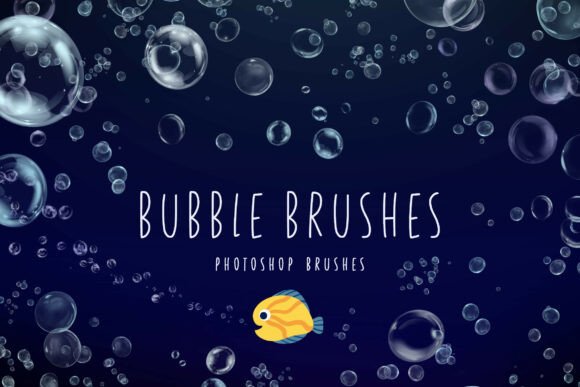
For digital artists and designers, achieving realism in fluid or airborne elements can be a challenging task. The Bubble Photoshop Brushes set offers a solution specifically tailored for those looking to incorporate convincing bubbles into their work. These brushes are engineered to replicate the fragile, shimmering quality of soap bubbles and underwater air pockets, using high-fidelity textures that capture reflections, distortion, and transparency with precision.
What Sets Bubble Photoshop Brushes Apart
Unlike generic brush sets that rely on simplified textures or flat transparency effects, Bubble Photoshop Brushes are built with dynamic responses to pressure and flow settings. This allows for a more natural painting experience, where each stroke can produce bubbles that vary in size and opacity based on how the artist applies the brush. The inclusion of both soapy and underwater-style textures adds versatility, making this set suitable for a wide range of visual contexts.
The brushes also support iridescent effects through soft color overlays, enabling the recreation of the rainbow-like shimmer seen on real bubbles. This level of detail is especially useful for illustrators working on fantasy or ethereal themes where realism meets imagination.
Comparing Bubble Photoshop Brushes to Other Options
There are several approaches to adding bubbles to a digital composition. Some artists rely on stock images or layer styles, while others use third-party plugins or manually paint each bubble. Each method has its advantages and drawbacks.
- Stock images offer realism but can be repetitive and lack customization.
- Layer styles provide some flexibility but often fail to capture the organic variation of real bubbles.
- Plugins can automate effects but may be overkill for simple projects or require additional setup.
In contrast, Bubble Photoshop Brushes strike a balance between control and efficiency. They allow for creative freedom without the need for complex tools or external assets. For artists who frequently work with water, air, or magical effects, these brushes can become a go-to resource.
When Bubble Photoshop Brushes Are the Right Choice
If your work involves creating scenes that include air bubbles, froth, or delicate floating orbs, the Bubble Photoshop Brushes are likely a good fit. They are particularly useful in the following scenarios:
- Underwater illustrations – where air pockets and bubble trails enhance realism.
- Fantasy or magical scenes – where glowing or iridescent bubbles can add a whimsical touch.
- Product mockups or advertisements – such as for beverages or bath products, where bubbles are a key visual element.
These brushes are also ideal for digital painters who use pressure-sensitive tablets, as the dynamic response allows for intuitive and expressive bubble creation.
Understanding the Tradeoffs
While the Bubble Photoshop Brushes offer many benefits, they are not a universal solution. For example, if you need to simulate large volumes of foam or complex fluid dynamics, a dedicated simulation tool or 3D software might be more appropriate. Similarly, if you're working in a non-Photoshop environment, you may need to look for compatible alternatives or convert brush formats, which can sometimes lead to inconsistencies.
Another consideration is the learning curve. While the brushes are designed to be user-friendly, achieving the most realistic results often requires some experimentation with blending modes, opacity settings, and color overlays. Artists new to Photoshop may find this process a bit daunting at first.
Practical Examples and Use Cases
Consider a designer working on a summer-themed poster for a beach festival. Using Bubble Photoshop Brushes, they can quickly add a sense of motion and playfulness by scattering soap bubbles around the main imagery. Alternatively, a fantasy illustrator might use the iridescent bubble brushes to create magical floating orbs that enhance the mystical atmosphere of their scene.
In a more technical context, a concept artist designing a sci-fi submarine might use the underwater air pocket brushes to simulate bubbles escaping from a hatch. This adds environmental realism without requiring time-consuming manual painting.
Alternatives and Complementary Tools
While Bubble Photoshop Brushes are a strong choice for their intended purpose, there are alternative methods and tools that may better suit specific needs. For instance, artists who work extensively with particle systems might prefer using Adobe’s built-in tools like the Liquify filter or third-party plugins like ParticleShop. Those who create 3D environments may find it more efficient to render bubbles in a 3D package and composite them into their Photoshop work.
Additionally, there are other specialized brush sets available that focus on water droplets, mist, or fog effects. Depending on the project, combining these with Bubble Photoshop Brushes can create a richer, more layered atmosphere.
Final Considerations for Decision-Makers
When deciding whether to incorporate Bubble Photoshop Brushes into your workflow, it's important to assess your specific project needs and artistic goals. If you frequently create digital compositions that benefit from realistic or stylized bubble effects, these brushes can significantly streamline your process and elevate the quality of your visuals.
However, if your work rarely involves such elements or requires more advanced simulation features, it may be worth exploring other resources. Ultimately, the best tools are those that align with your creative style, technical environment, and project demands.